Split Screen Mattes DCTLs by Mononodes is an advanced tool created to simplify the process of building dynamic split screen layouts inside DaVinci Resolve. Designed for professional editors, filmmakers, and content creators, this tool allows users to generate organized multi-panel video layouts without complex node setups or static overlay files.
Split screen editing is widely used in modern video production to display multiple clips within a single frame. It is a popular technique for music videos, advertisements, cinematic trailers, product presentations, and multi-camera edits. The approach allows editors to compare scenes, showcase different camera angles, or create visually engaging collages of motion content.
Traditionally, creating split screen compositions required significant manual work. Editors had to rely on complex node setups inside the Fusion page of DaVinci Resolve. While powerful, Fusion workflows can become time-consuming when multiple video panels need precise placement and resizing. Even small adjustments such as changing panel spacing or layout structure often required manual recalculations and repositioning.
Another common method involved using pre-designed PNG overlays or graphic templates. While these overlays could provide basic grid layouts, they lacked flexibility. Editors could not easily change the number of panels, adjust spacing, or adapt layouts to different project resolutions. Any change to aspect ratio or frame size required creating new overlay files, which slowed down the workflow.
Some editors also used basic layering techniques in the Edit Page, manually cropping and masking video clips to simulate split screens. This approach worked for simple two-clip layouts but quickly became impractical when working with multiple panels or complex designs. Maintaining perfect alignment, spacing, and proportions required constant adjustments.
Split Screen Mattes DCTLs solves these challenges by introducing a dynamic system for generating split screen layouts directly inside the Color Page of DaVinci Resolve. Instead of manually building grids or masks, the tool uses DCTL technology to calculate layouts in real time. This means users can adjust parameters instantly and see the results immediately without rebuilding their setup.
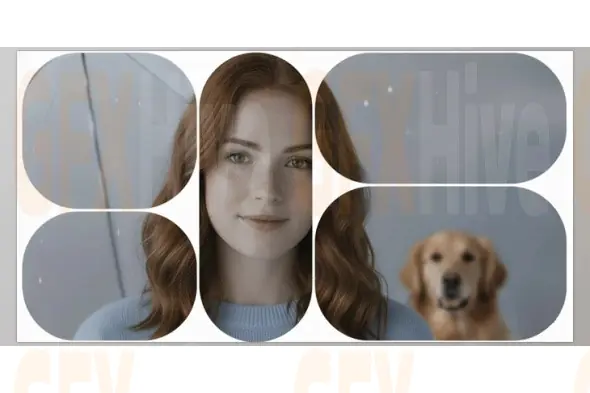
The tool includes three versatile layout styles designed to suit different creative needs. The Structure layout creates organized rows and grid systems that are ideal for clean, professional multi-panel displays. Editors can control the number of panels, spacing between them, and corner shapes, making it perfect for structured video comparisons or multi-camera layouts.
The Organic layout offers a more fluid and creative approach. Panels appear in smooth, dynamic arrangements that feel less rigid and more natural. This layout style works particularly well for music videos, experimental visuals, and motion graphics projects that require a lively and expressive design.
The Steady layout focuses on geometric balance and precision. It provides symmetrical panel arrangements that work well for corporate content, product presentations, and commercial video projects where visual clarity and professionalism are essential.
One of the most powerful features of Split Screen Mattes DCTLs is its real-time control system. Editors can easily adjust the number of panels, spacing between cells, and the overall layout structure using intuitive sliders. Panel shapes can also be changed to rectangles, circles, or triangles, allowing for more creative and visually diverse compositions.
Additional parameters such as Chaos and Waviness allow users to introduce subtle irregularities into the layout, creating more organic and natural-looking designs. These options are particularly useful when building dynamic visual collages that avoid rigid grid structures.
The tool also includes transformation controls that allow layouts to be flipped or rotated instantly without manual adjustments. This provides even greater flexibility when designing layouts for different creative concepts.
Another major advantage of Split Screen Mattes DCTLs is its resolution independence. Layouts automatically adapt to different project resolutions and aspect ratios without requiring additional files or manual adjustments. Whether working on vertical social media content, widescreen cinematic footage, or standard video formats, the layout remains perfectly responsive.
This level of flexibility dramatically reduces editing time. For example, a complex multi-camera music video that would normally require hours of manual layout work can now be arranged in just a few minutes. Editors can quickly generate multiple variations and experiment with different compositions without rebuilding the entire structure.
For even more creative possibilities, the tool includes a Seed parameter that generates new layout variations instantly while keeping the same base settings. This makes it easy to explore different arrangements and find the most visually appealing composition for a project.
Editors can also highlight specific panels within structured layouts to draw attention to key scenes while maintaining the overall grid design. This technique is especially useful for storytelling edits, reaction videos, product comparisons, and cinematic breakdowns.
Split Screen Mattes DCTLs by Mononodes offers a modern approach to split screen editing that combines speed, flexibility, and professional design control. By eliminating the need for complicated node setups and static overlays, it allows creators to focus on storytelling and visual creativity rather than technical layout construction.
Whether you are producing music videos, multi-camera interviews, motion graphics collages, commercial advertisements, or film analysis videos, this tool provides a powerful and efficient way to build dynamic multi-screen layouts inside DaVinci Resolve.
Subscribe to access unlimited downloads of themes, videos, graphics, plugins, and more premium assets for your creative needs.
Published:
Mar 12, 2026 01:59 PM
Category:
Tags: