50% off Limited Time - 10000+ Premium Graphics & Visual Effects! 🚀 Join Now

Hyperionics – Download HyperSnap v10.2.1

Hyperionics – Download HyperSnap v10.2.1
Premium
File Details
Name: Hyperionics – Download HyperSnap v10.2.1
Scanned: Jul 31, 2026 02:17 AM
Via: VirusTotal
0/62
No threats detected

We ensure to scan files again before use

Scan Again

Report us if any issues


Hyperionics – Download HyperSnap v10.2.1

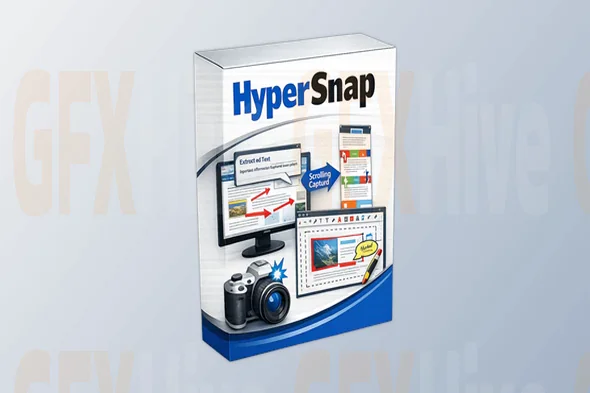
Hyperionics HyperSnap v10.2.1 is one of the most powerful screen capture and screenshot editing applications available for Windows. Designed for professionals, content creators, software developers, technical writers, educators, and IT specialists, HyperSnap provides everything needed to capture, edit, annotate, and share high-quality screenshots with ease.

Unlike basic screenshot utilities, HyperSnap allows users to capture scrolling windows, active windows, games, menus, DirectX applications, virtual desktops, and full-screen displays. Its built-in image editor includes professional annotation tools, highlighting features, text insertion, cropping, resizing, watermarking, and color adjustments, making it a complete screenshot solution.

Whether you're creating software documentation, tutorials, presentations, bug reports, training materials, or product demonstrations, HyperSnap helps produce professional-quality images quickly and efficiently.

Key Features of Hyperionics HyperSnap v10.2.1

  • Advanced screen capture technology
  • Full-screen screenshot capture
  • Scrolling window capture
  • Active window capture
  • Region and custom area selection
  • DirectX and game capture support
  • Built-in image editor
  • Powerful annotation tools
  • Add arrows, text, and shapes
  • Highlight important content
  • OCR (Optical Character Recognition) support
  • Image cropping and resizing
  • Color correction tools
  • Watermark support
  • Automatic file naming
  • Clipboard integration
  • Multiple image export formats
  • Keyboard shortcut customization
  • Fast performance
  • User-friendly interface

Why Choose HyperSnap v10.2.1?

HyperSnap is much more than a traditional screenshot tool. It combines advanced capture technology with a comprehensive image editing suite, allowing users to produce polished screenshots without relying on additional software.

Its scrolling capture feature is especially valuable for documenting long webpages, software interfaces, and documents. The built-in OCR functionality also enables users to extract editable text directly from captured images, improving productivity and workflow efficiency.

Professionals across multiple industries rely on HyperSnap because it simplifies documentation, technical support, software testing, and content creation.

Benefits of Hyperionics HyperSnap

  • Capture professional-quality screenshots
  • Save time with scrolling capture
  • Create better tutorials and documentation
  • Improve software bug reporting
  • Annotate images quickly
  • Extract text using OCR
  • Enhance presentations
  • Improve workflow efficiency
  • Edit screenshots without external software
  • Produce high-quality visual documentation

Perfect For

  • Software developers
  • Technical writers
  • IT professionals
  • Customer support teams
  • QA testers
  • Graphic designers
  • Content creators
  • Bloggers
  • Educators
  • Students
  • Digital marketers
  • Business professionals
  • Trainers
  • Documentation specialists
  • Windows users

System Requirements

  • Windows 10 or Windows 11
  • 64-bit processor
  • Minimum 2 GB RAM
  • 300 MB available storage
  • Internet connection for updates

Why Download from GFXHive?

GFXHive provides high-quality software, creative assets, design resources, plugins, templates, and professional digital tools for designers, developers, creators, and business users. Every resource is carefully maintained to ensure a smooth download experience and access to the latest available versions.

Get unlimited downloads

Subscribe to access unlimited downloads of themes, videos, graphics, plugins, and more premium assets for your creative needs.

Subscribe to download
License Option
Quality checked by GFXHive
scanned and Uploaded
Documentation Included
Future updates as available
Installation Support

New_GFXHive's items

Gumroad - Watercolor Brushes for Procreate - Adilson Farias - Brushes for Procreate

By New_GFXHive in Others

₹234
Peregrine Labs - Yeti 5.2.4 Maya 2024-2026 (Win)

By New_GFXHive in Others

₹233
Film Space - Film Frames Animations V2

By New_GFXHive in Others

₹230
Learn Adobe Firefly Experiment with Generative AI Image

By New_GFXHive in Tutorial

₹233
Alex on Raw - Creative Styles for Capture One

By New_GFXHive in Illustrator

₹227
FinalcutPlugs - Effects Expansion Pack

By New_GFXHive in FCPX & Apple Motion

₹226

Similar items

TechSmith Camtasia v24.1.3.5321 (Win)

By GFXHive in Software

₹210
APU Software APU Loudness Compressor v3.4.1 (Win)

By GFXHive in Software

₹221
Agisoft Metashape Professional v2.2.1 Build 20051 (Windows)

By GFXHive in Software

₹176
Maxon Cinema 4D Studio v2025.1.2 (Win)

By GFXHive in Software

₹229
Luxion KeyShot PRO 2024.3 v13.2.0.184 (Win)

By GFXHive in Software

₹209
Topaz Video AI v6.0.4 (Win)

By GFXHive in Software

₹232

We use cookies to personalize your experience. By continuing to visit this website you agree to our use of cookies