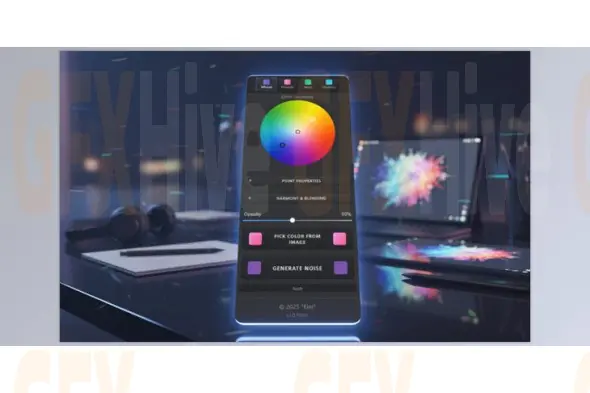
Elevate your photo editing and digital art with the Ultimate Color Grading Color Wheel for Photoshop, a professional plug-in designed to make color grading intuitive, fast, and visually precise. Perfect for photographers, retouchers, and digital artists, this tool simplifies color harmony, contrast, and palette management, giving your images a polished, cinematic quality without guesswork.
Color grading can dramatically shape the mood and impact of an image, but achieving consistent and balanced results often requires complex layers and adjustments. The Ultimate Color Grading Color Wheel eliminates the frustration by providing a visual, interactive way to adjust highlights, midtones, and shadows while maintaining color relationships that enhance depth, contrast, and harmony.
Why the Ultimate Color Grading Color Wheel Matters:
Balanced Colors: Achieve cinematic tones that feel natural and professional.
Consistent Palettes: Apply harmonious color schemes across photo series or projects.
Controlled Contrast: Subtle use of warm and cool colors adds depth without overprocessing.
Cinematic Look Instantly: Introduce teal shadows and warm highlights for effortless professional results.
Key Features:
Advanced Color Harmony Tools: 5 Harmony Modes – Manual, Analogous, Triad, Complementary, Split-Complementary – for building visually appealing color relationships.
Live Preview: See changes in real-time, making gradient map adjustments intuitive and accurate.
Smart Color Picker: Sample colors from your image to create harmonious palettes, perfect for portraits, fashion photography, and series shots.
Unlimited Undo/Redo: Non-destructive editing ensures confidence and flexibility in every adjustment.
Custom Presets & Workflow Sharing: Save, import, and export gradient map presets via JSON for team collaboration and brand consistency.
Built-in Presets: Start editing immediately with 9 professional styles, including Teal & Orange, Sunset, Vintage, Moody, Arctic, and more.
Pro Techniques for Better Results:
Start subtle: Minor color shifts often create more professional and natural effects.
Anchor with sampled colors: Use the color picker to ground your harmony in the original photo.
Use presets as a foundation: Apply a preset, then fine-tune for custom results.
Check skin tones: Keep midtones neutral in portraits while adding creative colors to shadows and highlights.
Compare before/after: Toggle views regularly to ensure your grading enhances the image without overpowering it.
The Ultimate Color Grading Color Wheel for Photoshop gives you complete control over your color grading workflow. Whether you’re creating cinematic photos, fashion images, or professional photo series, this plug-in simplifies complex adjustments, maintains natural skin tones, and ensures every image has a cohesive, professional look.
Subscribe to access unlimited downloads of themes, videos, graphics, plugins, and more premium assets for your creative needs.
Published:
Feb 02, 2026 02:27 PM
Category:
Tags: